No internet needed. Runs smoothly on your Windows PC with 100% private local storage, lightning-fast barcode billing, size/color variant management, and instant receipt printing.
Engineered for Garment Retail Excellence
Everything your clothing shop needs to bill faster, prevent stock shrinkage, track customer preferences, and maximize profits.
Fast barcode scanning, instant variant selection, item discounts, split tender payments, and sub-second receipt printing.
Full lifecycle inventory tracking from supplier purchase stock-in to physical count adjustments and low-stock alerts.
Multi-variant apparel support. Track sizes XS-XXXL and numeric waist/chest sizes independently with their own barcodes and stock.
Automatic focus and F1 hotkey support for all handheld 1D and 2D USB/wireless scanners. Instant product lookup.
Interactive Recharts area charts showing weekly trends, gross profit margins, cashier performance, and category sales velocity.
Easily create clothing styles with brand, cost, retail, wholesale, and minimum reorder alert levels.
Manage clothing mills, fabric distributors, payables balances, and record purchase invoices with automatic stock increment.
Maintain buyer profiles for Walk-in, VIP, Regular, and Wholesale clients with loyalty reward points and outstanding credit ledgers.
Dedicated workflow to exchange garments for different sizes or colors, automatically calculating price differences and restocking.
Native ESC/POS printing for 80mm & 58mm thermal rolls, A4 PDF invoices, and offline SVG barcode clothing price tag printing.
Embedded WebAssembly SQLite database stored locally on your Windows PC. No cloud outage can ever stop your shop from selling.
Backup your store data with a single click to your hard drive or USB thumb drive with automatic pre-restore safety snapshots.
Plug-and-Play Retail Peripherals
Compatible with standard retail hardware without proprietary driver locks
Supports all HID USB and 2.4GHz wireless handheld clothing tag scanners.
Instant silent printing on standard 80mm and 58mm ESC/POS thermal receipt rolls.
Generates SVG barcodes for 50x30mm and 40x25mm sticky clothing price tags.
Sends automatic kick-pulse trigger to open cash drawer on completed transactions.
Why 100% Offline?
See how our offline desktop architecture protects your business from internet outages
| Feature | GarmentPOS Offline | Online Cloud POS |
|---|---|---|
| Internet Required | No (100% Offline) | Usually Yes |
| Billing Speed | Instant Local Billing | Depends on Network Latency |
| Size & Color Inventory | Built-In Multi-Variant | Depends on Software |
| Data Storage & Ownership | Local PC (Your Control) | Remote Cloud Server |
| Monthly Subscription | No recurring fee by default | Monthly / Annual Fee |
| Barcode Scanning Support | Yes (Auto-focus & F1) | Yes |
| Clothing Returns & Exchanges | Built-In Size/Color Workflow | Complex or Missing |
| Data Privacy | 100% Private Local Data | Shared Cloud Infrastructure |
The GarmentPOS Experience
Modeled on real clothing store retail workflows
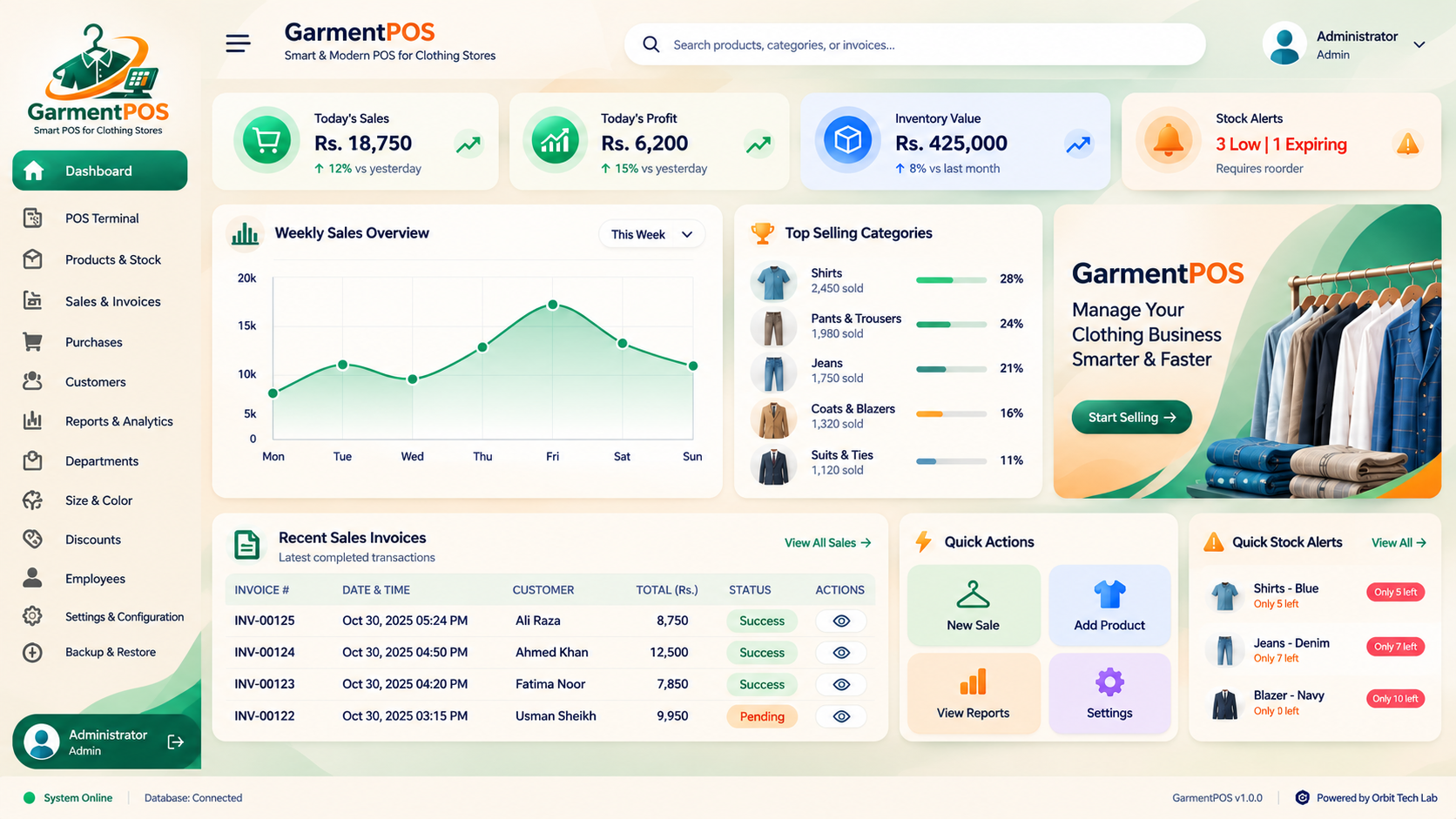
Today's Sales, Gross Profit, Total Inventory Valuation, and Low Stock Alerts updated in real-time from SQLite records.
Weekly sales overview with Recharts smooth gradients, volume trends, and clothing category progress bars.
One-click jump to New Sale, Add Product Variant, View Reports, or preview recent invoices with full PDF download.
Got Questions? We Have Answers
Everything you need to know about the GarmentPOS offline retail system
No, GarmentPOS is 100% offline native. All your clothing variants, barcodes, customer ledgers, sales records, and financial reports are saved locally in SQLite directly on your computer. Your business never stops during internet outages.
GarmentPOS natively supports standard 80mm and 58mm ESC/POS thermal printers connected via USB, Bluetooth, or virtual Windows spooler, plus full A4 invoice printing. Automatic cash drawer triggering is fully integrated.
You can define multiple size scales (Alpha: XS–XXXL, Numeric: 28–42) and apparel colors. Each size/color variation gets an independent SKU, barcode sticky label, retail price, and stock counter.
Yes! Standard 1D and 2D handheld USB barcode scanners work plug-and-play without special drivers. The POS terminal includes an auto-focus search bar and an F1 hotkey shortcut for instant barcode scanning.
With one click in the Backup & Restore module, you can export a full database snapshot directly to any external USB flash drive or local folder. Restoring from a backup includes an automated safety pre-backup to prevent accidental data loss.
Download the complete setup file for Windows 10 & 11. Installs easily with a desktop shortcut so you can start billing immediately.
GarmentPOS Setup 1.0.0-x64 (Windows 64-bit)
Safe setup file. Double-click the installer on your PC to create your desktop shortcut.
Download the setup installer to your computer.
Open the installer and follow the simple on-screen instructions.
Double-click the desktop icon and start serving customers offline!
Powered by Orbit Tech Lab
GarmentPOS is developed and supported by Orbit Tech Lab. Contact our engineering team for technical inquiries and custom retail integrations.